Wer aufhört, besser werden zu wollen, hört auf, gut zu sein.
(Those who stop trying to advance, stop being good.)
Marie von Ebner-Eschenbach
Personal Information Management (PIM) can be understood in a narrower sense (Calendar, Todos, Contacs) or in a very broad sense which I do prefer: it is the art of organizing yourself and your data.
I don't even limit PIM to digital data. I've started loving PIM before I was aware of its existence: I was the one in school who was designing and optimizing his Filofax paper sheets, who knew why the previous twenty marks (and their average) were not optimal, when a teacher is going to ask me to summarize the previous lecture by maintaining statistics, and so forth.
So I am an organizer freak and I like fiddling with my personal workflows.
For a couple of years I was lucky do be able to do basic research on PIM topics and I wrote my PhD thesis I am very proud of.
In my spare time, I optimize my personal workflows, write little helper tools (GitHub, GitLab, Codeberg), help others to work more efficiently, look for the best tools out there that match my requirements, have more fun with the tools we have to use, learn from the experience of others, give talks about PIM.
This is what I love, this is what I do for fun.
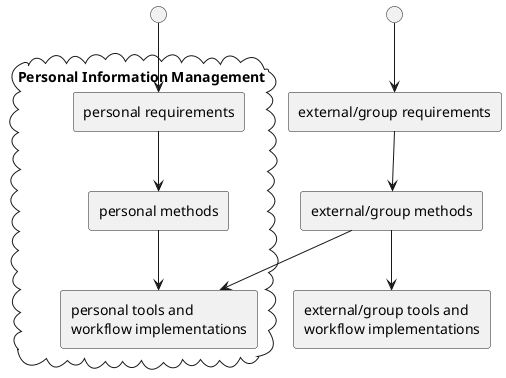
From 2014 to 2021, I taught my PIM lecture (1ECTS) at the St. Pölten University of Applied Sciences. My students are surprised, how inefficient they were doing even «common» things like handling email, managing files like photographs on your computer, or searching for information. It is so rewarding to see students realizing how much improvement is possible with some background-knowledge and a few hints here or there. In 2021 and 2024, I held that PIM lecture in an extended way (2ECTS) at Graz University of Technology.
I hereby claim that I am able to save you at least twenty minutes of your computer time a day just by looking over your shoulder and suggesting more advanced tools, better methods, and efficient workflows. Multiply this with your computer-life and you get a small glimpse what it is possible. However, it's still your decision if you want to use this extra-time to get more stuff done or if you want to enjoy more spare time instead. ;-)
I 2023, I gave a 44min talk on various selected topics related to PIM which might be of general interest.
Some general PIM articles:
- How to choose a tool
- How to Use Tags
- The Advantages of Text-Based Information Versus Videos, Audio or Images
- The Desktop Metaphor: Once Awesome, Now Hindrance
- Mit dem
Traktor pendeln (German)
- Über Engstirnigkeit bei der Benutzung von Computern als Werkzeug.
Some tool-related PIM articles:
- What software am I
using for what
- In case you wonder about my current software choices for my personal requirements.
- Efficiently
managing files
- A cool concept and a set of tools like
filetagsI developed to manage files such as photographs via tags.
- A cool concept and a set of tools like
- My UOMF article series on how I'm using Emacs Org mode
You might also check out my articles on emacs, privacy, quantified self, security, and surveillance.
 Subscribe to the Atom feed for the tag pim (What is a feed?).
Articles with the tag pim also have other tags you might use to drill down your navigation:
All articles tagged with pim (sorted by last update, oldest on top):
- Enable remote URL opening from screen to Firefox at OS X
- Wilde Artefakte in Testbild von Lenovo/IBM
- Optimizing Outlook: Teil 1, das Vorhaben
- Nostalgie: Meine IT-System-Historie
- (m)ein optimales IT-Setup, der vierte Versuch
- Mythos: schnelles Windows
- WTWN: Vollintegriertes Tagging für Dateien (Update1)
- Zahlen in Verzeichnisnamen sind böse
- Optimizing Outlook/Email: Teil 2, Fazit
- WTWN: Ablaufdatum für alle Daten
- PalmOS ist tot. Lang lebe PalmOS!
- How I am using Firefox
- Vancouver: PIM09 - erster Tag
- GTD: Task Management With Android Software Apps
- PIM: Action method as task management
- Agendus is coming to WebOS and Android
- GTD using Doit.im (Web + Android)
- Easy data handling with git-annex
- Org-mode
- Label-dependencies with Google Mail
- Mit dem Traktor pendeln
- Den Computer halbwegs sicher betreiben
- Podcast über Open Science mit mir
- Darum Life-Logging
- What Do People Use to Get Stuff Done?
- Emacs Chat with Sacha Chua
- Per-contact FROM-email Addresses for Users Of mutt and org-contacts.el
- Grazer Linuxtage: Was willst du von mir sehen und was ich von dir sehen möchte
- Meine Vorträge auf den Grazer Linuxtagen 2015
- Web Browser Keywords
- Productivity Expert Tips: Apple, UI, Teaching PIM, Updates
- Outlook: Keep Appointments You're Not Attending on Your Calendar
- Emacs: Use Different Search Methods Depending on Number of Lines
- UOMF: Quick Access to My Org Mode Agenda on Android
- Todo Management on Paper
- Thinking About a notmuch-based Email Setup
- Outlook: Adding Preparation/Postprocessing/Travel Time to an Appointment
- Fast Opening of Memacs Indexed Files
- Smart Pens
- How to Use This Blog Efficiently
- Choosing the Wrong Mobile Messenger Might Inprison You
- Addicted to Your Mobile Phone or the Internet? Make it Stop
- gThumb for Managing Photographs
- Twitter Lent
- Mediocrity
- A CEO's Guide to Emacs
- Logical Disjunct Categories Don't Work
- Digitale Selbstverteidigung in Zeiten der Cloud
- My Emacs Configuration In Org-mode
- How To Read Magazines Efficiently
- org-du: Visualizing Org-mode Heading Sizes
- UOMF: Org Mode As a Rabbit Hole: Agenda Tasks Piling Up
- The LaTeX Fetish. Or: Choose Your Tools Wisely
- Filetags now features tagtrees as well
- Think About Switching to An US International Keyboard Layout
- Essential Keyboard Shortcuts
- PhD Students: Add a Reference to Your Future PhD into Papers
- Tod dem CAPS LOCK!
- Wissensverwaltung auf Papier und digital
- Organize Your Life With Org-Mode
- UOMF: Advanced Usage of Dependencies Between Tasks Using Org Mode
- My Personal Emacs History
- How to Let Your Colleagues See Your Calendar
- Staying Functional When Dealing With Frequent Interruptions
- A Reasonable Secure Environment for Reading Potentially Harmful Emails
- OneNote Will Be Discontinued, Evernote Will Follow Some Day - Switch to Something Much Better
- Optimize Your (Multi-Language) Keyboard Setup, vim, dotfiles, and More
- UOMF: My Emacs Key Binding Strategy
- My Folder Hierarchy
- The Desktop Metaphor: Once Awesome, Now Hindrance
- We Need to Decentralize and Re-Invent Our Computer Systems
- RSS/Atom: Was ist das und wozu braucht man das?
- My Emacs Org Mode Demo on 35C3
- The Perfect Tool to Organize Your Digital Life (Emacs Org mode)
- Email Management: Inbox Zero versus Inbox Infinity and My Recommendations
- Microsoft OneNote
- Announcement: "How Do I Profit from Free and Open Source Software?"
- How Do I Profit from Free and Open Source Software? (GLT19-Talk)
- The Cost of Switching Software Tools
- TOTP 2FA Using oathtool in the Command Line
- On Not Using Tags for Categorizing Blog Articles of a Series
- Blog Series: Using Org Mode Features (UOMF)
- UOMF: Using Org Mode Categories Versus Tags
- Memacs: Major Update of the Filenametimestamp Module
- All Things Org Mode: PIM, Scientific Writing, Presentation, Programming
- Demo: Advanced File Management
- UOMF: My Current Org Mode Files and Heading Structure
- Migrating Media Meta-Data from Bashee to Rhythmbox
- RelFS: A Hypothetical Tag-Based File System by Nayuki
- You Can't Control Your Data in the Cloud
- Self-Limitation Due to Software Simplification
- The Disadvantages of Adding Todo Management Features to Arbitrary Software
- Don't Do Complex Folder Hierarchies - They Don't Work and This Is Why and What to Do Instead
- Evolutional Steps of Computer Systems
- It's OK to Give Away Your Personal Data to Cloud Companies
- Es ist in Ordnung, wenn du deine persönlichen Daten Cloud-Firmen gibst
- Migrating Org Mode Files from org-depend to org-edna
- UOMF: Linking to Text Within PDF Files
- Tagging Natural Objects
- The Nightmare of Files and Directories
- Tag Gardening on Publicvoit
- How to Design File Management for a Company
- The Rise and Fall of Getting Things Done
- Don't Ask for Features When You Still Need a Method
- UOMF: My Current Life-Cycle of an Org Mode Task
- Cal Newport on How to Work Efficiently
- Email Folders Are Not a Good Todo Management Tool
- Email Debt Forgiveness Day
- Textbausteine/Snippets als praktisches Helferlein im Alltag
- Join my PIM Lecture at TU Graz WS2021
- UOMF: The Right Way to Use Org Mode
- Young Users No Longer Know How to File and Navigate
- Digitizing All Your Paper Stuff
- UOMF: Logging With Emacs Org Mode
- A Draft Workflow for Advanced Project Management Using Org Mode and Org Edna
- UOMF: Semi-Automate Boring Tasks: Replacing Twitter-Snippets
- UOMF: My Current Mobile Capture Process
- My Backup Script: Rsync-Based With Orgmode-Friendly Summary and Desktop Notifications
- UOMF: Path-Independent Links to Local Files Via Locate
- External Links to Outlook Emails Get Broken When Emails Are Moved
- Mood-Setting Productivity Environments
- Outlook and Its Integrated Todo Management
- My Org-mode Session at the BarCamp 22 in Graz
- UOMF: Reference Management with Org Mode
- Zettelkasten/Org-roam/Org-brain Is Crap
- Use the Reply-To Header in Emails
- UOMF: Easy Dependency Creation With org-linker-edna
- Nobody Needs a Generic Folder Hierarchy Convention
- Blog Series: My Tags
- My Tags: "maybedouble" "double"
- My Tags: "publicvoit"
- Wie wirklich ergonomische Tastaturen aussehen
- Der Einstieg in GNU Emacs und Org-mode
- Mobile Capturing of Tasks Using a Hipster PDA
- git: post-commit hook for determining large number of deleted lines in Org-mode
- Tagging Files With Windows 10
- Herzlich Willkommen an alle PIM-Interessierten
- UOMF: Linking Headings With org-super-links (Poor-Man's Zettelkasten)
- "VLC for Android" as a Potential Replacement For "MX Player"
- UOMF: How to Start With Emacs Org Mode
- How to Use Tags
- Join my PIM Lecture at TU Graz WS2024
- My Dependencies on the Cloud
- Sharing Selected Org-Mode Data With Logseq Users
- Managing Digital Files (e.g., Photographs) in Files and Folders
- Ideal OS: Modern Desktop Operating Systems Are Bloated, Slow, and Layered With Legacy Cruft
- Searching and Downloading YouTube Videos Via Shellscripts
- UOMF: Managing web bookmarks with Org Mode
- (Voit's) Law of Workflow Usefulness
- (Voit's) Law of Tool Usefulness
- (Voit's) Law of Fanboy Appearance
- Worklab 2023: "The Art of Organizing Yourself and Your Data"
- Feedback zur Podcastepisode FOCUS ON: Linux 140 zu Org-Tools
- UOMF: On How to Define Projects in Org Mode
- Nobody's Perfect: My Personal PIM Debt
- Managing Network Devices via Org-mode Table and OpenWRT Router
- UOMF: Linking Headings
- The Advantages of Text-Based Information Versus Videos, Audio or Images
- Logseq from an Org-mode Point of View
- Join my PIM Lecture at TU Graz
- Markdown Is a Disaster: Why and What to Do Instead
- Switching Windows and Desktops According to Window Names and Text Search
- UOMF: Generate a List for the next Upcoming Recurring Meeting Instances
- It's Good Enough
- My Hardware Setup
- Emacs vs. vim Real World Analogy: Cargo Bike Vs. Folding Bike
- Tipps zur Passwortsicherheit
- How to Choose a Tool
- Are we stuck with the same Desktop UX forever?
- Potential Markdown Data Loss When You Will Move Away from Obsidian (MIGHT BE FALSE)
- My Emacs and Org-mode Workshops at the GLT26
- Moving from Thunderbird to Evolution for Emails and Calendar
- The Emacs Lock-In Effect or the Emacs Sunk Cost Fallacy
- Wie man eine vertrauenswürdige Authentifizierungs-App auswählt
- People Describing Their Hardware/Software Setup
- Leserbrief: Vorschlag, wie ein Podcast (minkorrekt) ein (Wordpress-)Forum durch das Fediverse ersetzen kann
- What App am I Using for What and How?
- Add Comments to Your (Static) Blog Using Fediverse Hashtags
- UOMF: Requirement Analysis and Solution Deciding Template in Yankpad